Paralives Paramaker Guide: How to Forge Your New Digital Life
Building a fresh digital life is a massive undertaking, but mastering the Paramaker ensures you start on the right foot.
When you kick off a new household, the game dumps you directly into the creator with a completely randomized character. You can click the dice icon to scramble them again or tap the house icon with the plus symbol if you prefer to import an existing household from your Library. On the left side of the screen, you get three massive categories: Appearance, Clothing, and Personality. I went through every single toggle and menu so you know exactly what you are getting into.
Structuring the Shell
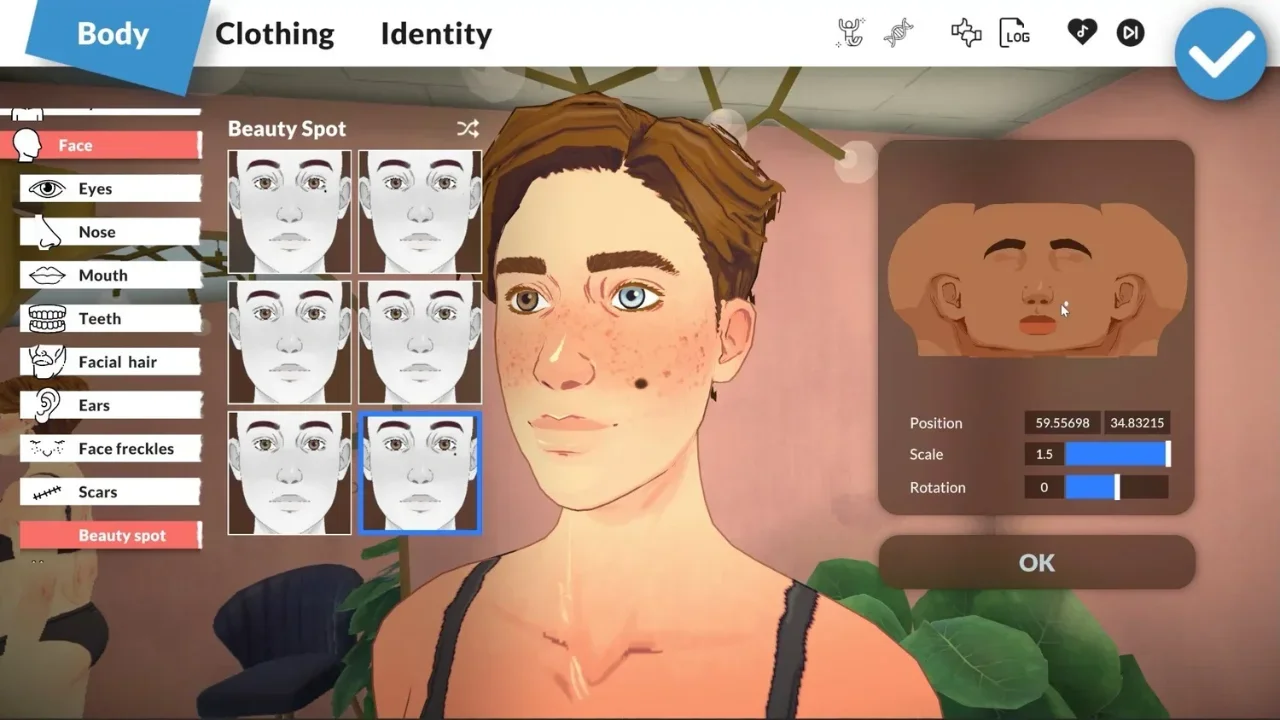
The Appearance tab is where you handle all the physical traits. It breaks down into Body, Face, Hair, Makeup, and Tattoos, giving you an absurd amount of granular control.
Body and Face Construction
You start by picking a skin tone and one of the 12 base body presets. If none of those fit your vision, the sliders on the right let you manually stretch and squish proportions until you are happy. You also get to lock in chest and bottom shapes here. Do not skip the details tab, where you can add acne, birthmarks, moles, scars, and freckles. There is even a handy toggle to make their body hair automatically match whatever is growing on their head. Moving to the face, you have a solid selection of presets for eyes, noses, mouths, and ears. Again, sliders are there if you want to get hyper-specific. This is also where you finalize eye color, eyebrows, eyelashes, and facial hair.
Hair, Ink, and Makeup
The hair options go surprisingly deep. You choose a general length category, but many styles have specific variants you can toggle, like ripping a cute bow right out of a long hairstyle. Picking a color is great because you can hit the plus icon to build a custom shade, selecting independent colors for the roots, the tips, and the base. You can right-click to edit those custom shades later. Makeup offers the standard eyeliner, lipstick, blush, and eyeshadow, alongside full-face options like clown paint. Every piece of makeup has a little circle icon you can click to tweak its color and intensity. You can even layer multiple makeup items of the same type if you want to look absolutely chaotic. For tattoos, there are currently 11 types you can plaster across the arms, legs, face, back, and chest. Once you drop some ink, you can adjust the scale, rotation, and color to get it just right.
Raiding the Closet
The Clothing tab handles your fashion for four distinct scenarios: Casual, Formal, Workout, and Pajamas. Each of these outfits is split into six categories to keep things organized.
Tops, Bottoms, and Overalls
You get everything from standard tees and dress shirts to swimwear and heavy winter layers. The absolute best feature here is the tucking mechanic. If a shirt can be tucked into your pants, a little shirt icon appears on its tile. Keep an eye out for the layer icon too, which lets you add or remove undershirts. Both tops and bottoms feature a color swatch menu that often hides completely different fabric patterns you can customize. If you hate matching outfits, jump into the Full Body section for overalls, jumpsuits, dresses, or a full cow costume. Many of these one-piece outfits come with their own undershirt toggles and pattern variations.
Footwear and Accessories
Your shoe choices cover all the basics from heavy boots to comfy slippers, but right now, you can only change their color. Accessories are where you add the finishing touches. This tab holds jewelry, gloves, tights, socks, nails, and underwear. It also includes medical items like hearing aids and face masks. For things like piercings or medical gear, a quick checkbox lets you assign the item strictly to the left side, the right side, or both.
Wiring the Brain
You can look amazing, but if you ignore the Personality tab, your digital life will be miserable. This section dictates your character's stats, lifestyle habits, and unique traits.
Stats and Living Habits
You have seven points to spread across four main stats: Physique, Mind, Creativity, and Charisma. Before you dump everything into one category, know that leaving a stat completely empty slaps you with permanent negative effects. Once the math is done, you pick your daily habits. This includes choosing if you eat meat or stick to a vegetarian diet, deciding if your sleep schedule leans toward early bird or night owl, and setting a cleanliness level from obsessively neat to totally sloppy.
Social Perks and Talents
Social Perks define how you handle the people around you. You can choose to be "Good at Being Alone" to grab bonuses when you isolate yourself, or go the opposite route with "Good at Cooperating" for group activity buffs. Other perks make you better at flirting, taking care of sad people, or making quick friends. Talents act as massive buffs for specific skill trees. "Fitness" makes you level up exercise routines faster and drastically reduces how often you need to shower. "Food" gives you extra starting recipes. "Music", "Art", and "Technology" all boost their respective hobbies. If you hate yourself, pick "Good at Nothing." Your skills level at a crawl and you get sick constantly. "Jack-of-All-Trades" is the safe bet, offering a tiny boost to everything.
Finding Your Vibe
The Vibe system is the core of how you interact with the world. It fundamentally changes dialogue options and passive behaviors.
The Final Paperwork
Look down at the bottom right corner of your screen. There is a little train ticket icon holding the last few administrative details.
Identity and Boundaries
You can punch in a standard first and last name, or click the three dots to add a middle name, a nickname, and toggle the display order. Right below that, you lock in an age bracket ranging from Baby up to Elder. Choosing your gender comes with an Advanced Options menu if you click the three dots next to the Non-Binary tag. This is where things get brilliantly specific. You can set pronouns, determine if you can get pregnant or cause pregnancy, and toggle breastfeeding. It also handles romantic boundaries. You can set up polyamory preferences and explicitly dictate if you are comfortable with your partner touching anyone else.
Voice and Exporting
Finally, pick your voice tone: Smooth, Rough, Mellow, or Silky. Make sure your volume is on, as clicking them plays a quick audio test. Once the character is completely wrapped, check the top right toolbar. You can save them to your Library, write a custom biography, or use the family tree button to manually set up relationship dynamics with anyone else you made. Hit the massive blue checkmark when you are ready to suffer the consequences of your creation in the actual game.